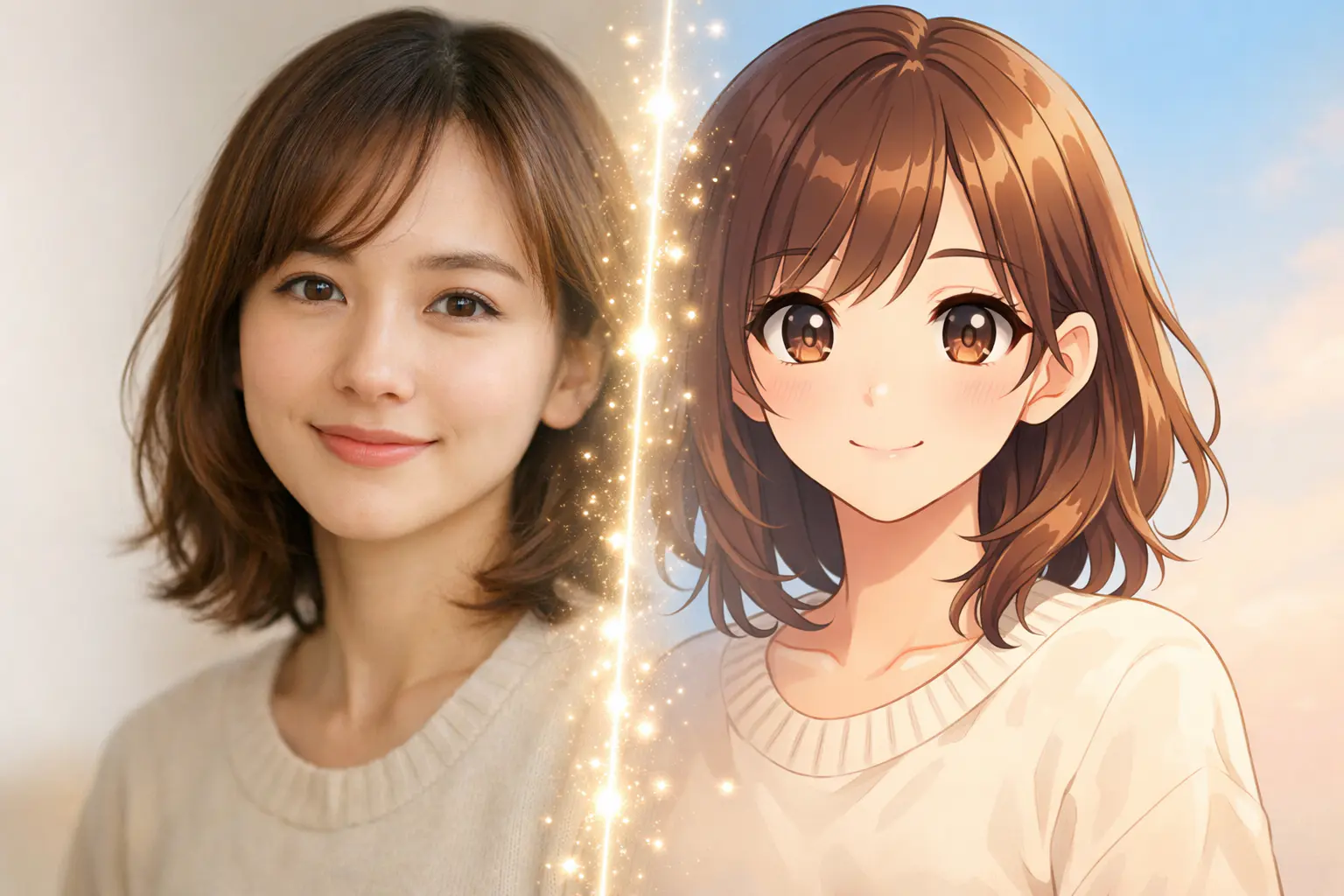
Have you ever looked at an anime character and thought, “I wish I could see myself like that”?
Good news—you don’t need to know how to draw, paint, or use complicated design software anymore. Thanks to AI, creating an anime portrait from your own photo is now quick, easy, and surprisingly fun.
In this beginner-friendly guide, I’ll walk you through what anime portraits are, how AI creates them, and how you can make your own anime-style portrait in just a few minutes.
What Is an Anime Portrait?
An anime portrait is a stylized illustration of a person inspired by Japanese anime art. Instead of focusing on realism, anime portraits highlight expressive eyes, soft facial features, and artistic color tones.
People use anime portraits for many reasons, such as:
- Profile pictures and avatars
- Personalized gifts
- Social media posts
- Creative self-expression
Anime style portraits feel personal, artistic, and often more expressive than regular photos—which is why they’ve become so popular online.
Why Use AI to Create Anime Portraits?
Traditionally, creating anime portraits required drawing skills and hours of effort. AI removes those barriers completely.
AI vs Manual Anime Drawing
With AI:
- You don’t need drawing experience
- Results are created in seconds
- You can try multiple styles instantly
- Anyone can do it
Who Is AI Anime Portraits For?
AI anime portrait tools are perfect for:
- Beginners with no art background
- Anime fans curious about AI art
- Content creators and influencers
- Anyone who wants a unique avatar
If you can upload a photo, you can create an anime portrait.
How AI Turns a Photo into an Anime Portrait
You might wonder how AI actually transforms a real image into an anime-style illustration.
Here’s what happens behind the scenes:
- You upload your photo
- AI analyzes facial features like eyes, face shape, and expressions
- An anime style is applied
- Your anime portrait is generated
This process allows AI to turn a regular photo into an anime portrait without manual editing.
Step-by-Step: How to Create an Anime Portrait Using AI
Step 1: Choose a Clear Photo
Start with a good-quality photo. For best results:
- Use proper lighting
- Make sure your face is clearly visible
- Avoid blurry or heavily filtered images
The clearer the photo, the better your anime portrait will look.
Step 2: Pick an Anime Style
There are many anime style portraits you can try, including:
- Soft and cute anime looks
- Classic anime character styles
- Pastel or fantasy-inspired themes
Don’t worry about choosing the “perfect” one right away—you can always try multiple styles.
Step 3: Generate Your Anime Portrait
Once your photo and style are selected, the AI takes over. In just a few seconds:
- Facial features are stylized
- Colors and shading are adjusted
- Your anime portrait appears
This part feels almost magical the first time you try it.
Step 4: Adjust and Download
Most AI tools let you:
- Generate different variations
- Compare results
- Download your favorite anime portrait
Trying a few versions often leads to better results, so don’t stop at the first one.
Popular Anime Portrait Styles You Can Try
Anime Family Portrait
An anime family portrait is a great idea if you want:
- A creative family keepsake
- A unique gift
- Anime-style group artwork
AI can turn multiple people into one consistent anime-style illustration.
Anime Side Portrait
An anime side portrait focuses on profile angles and artistic vibes. These are especially popular for:
- Social media profile photos
- Stylish avatars
- Minimalist designs
Stardew Valley–Inspired Anime Portraits
If you love cozy games, Stardew Valley anime portraits are a fun option. These portraits have a warm, pixel-art feel that many gamers enjoy.
Tips to Get Better Anime Portrait Results
Here are a few simple tips that make a big difference:
- Use photos with clean backgrounds
- Avoid adding filters before uploading
- Try different anime styles
- Generate more than one version
Small changes often lead to noticeably better anime portraits.
Common Mistakes to Avoid When Creating Anime Portraits
To avoid disappointment, try not to:
- Upload very low-quality images
- Expect a 100% realistic result
- Over-edit the final image
- Use photos where the face is partially hidden
Understanding what AI does best helps set the right expectations.
Can Anyone Create Anime Portraits Without Drawing Skills?
Absolutely.
AI makes it possible for anyone—even complete beginners—to create anime portraits. You don’t need artistic training, special software, or expensive tools.
If you’ve ever wanted to see yourself as an anime character, AI finally makes that easy.
Best Way to Create Anime Portraits Using AI
The easiest way to create anime portraits today is by using an AI-powered tool that handles everything automatically—from analyzing your photo to applying anime styles.
If you’d like to try it yourself, an Anime Portrait Generator makes the process simple and beginner-friendly.
Final Thoughts
Anime portraits are a fun blend of creativity and technology. Thanks to AI, turning a photo into anime-style art is no longer complicated or time-consuming.
Whether you’re creating a new avatar, experimenting with AI art, or just having fun, anime portraits are a great place to start. Try different styles, explore variations, and enjoy seeing yourself in anime form.